
In the previous article, we built and push docker images to dockerhub by using jenkins pipeline. We also created a github webhook that triggers this jenkins pipeline automatically when app source code git repo has any changes. Now we want to setup a tool called ArgoCD that automatically deploys our applications to kubernetes cluster if there is a change in our github repository (not app source repo but K8s config file repo).
ArgoCD is Continuous Delivery tool for Kubernetes Cluster. It is part of the Kubernetes cluster and it watches and pulls the yaml files from the specified Git repo and applies them onto Kubernetes Cluster. If someone manually changes something on K8s cluster by using kubectl apply command, ArgoCD detects that K8s and Git repo is out of sync and it syncs them to the desired state. So manual changes can be overwritten.
If application is broken with new changes, it can be taken to the previous state by using git revert command. So you don’t have to do anything on the cluster. Note that by using ArgoCD, we don’t need to give access to Kubernetes Cluster human users. It is enough to give them permission on git repo.
The flow of the CI-CD pipeline will be like this:
Developer pushes code → GitHub (website repo)
Jenkins pipeline builds Docker images & uploads images to DockerHub
Jenkins pipeline also updates the image tags in yaml files that resides website-deploy github repository
ArgoCD watches website-deploy repo & detects new image tags
Finally ArgoCD applies K8s yaml files to K8s cluster and deploys the application
<IMAGE GOES HERE>
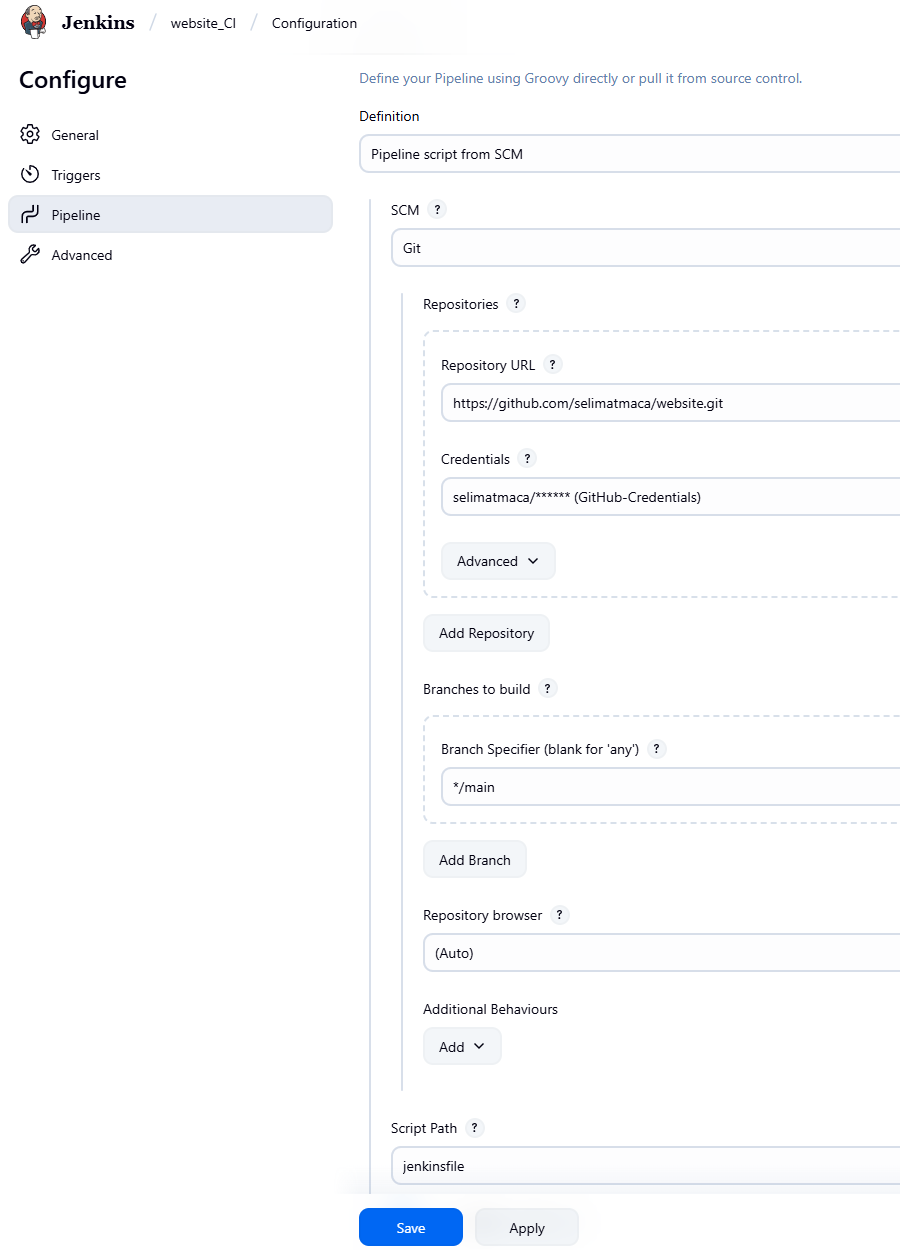
Let's make sure jenkins pipeline configuration is using the jenkinsfile that resides on git repository. Select pipeline (website_CI) > choose configuration > navigate to pipeline > make sure Definition is selected as "Pipeline script from SCM" and fill other fields accordingly.
We need to deploy ArgoCD in the cluster. Then configure it to use our Git Repository and start watching for any changes. The best practice is to keep your app source code and app configuration files (kubernetes yaml files) in different Git repositories. Therefore I will be using 2 git repos. website repo is for app source code & website-deploy is for K8s config files.
On Git-Hub, I created a new git repository named "website-deploy" first. Then on the local server I created a new folder named "website-deploy". website-deploy folder will keep our kubernetes config files.
mkdir website-deploy
cd website-deploy

git init
git add .
git commit -m "first-push"
git branch -M main
git remote add origin https://github.com/selimatmaca/website-deploy.git
git push -u origin main
Install ArgoCD on K8s Cluster
kubectl create namespace argocd
kubectl apply -n argocd -f https://raw.githubusercontent.com/argoproj/argo-cd/stable/manifests/install.yaml
kubectl -n argocd rollout status deploy/argocd-server
ArgoCD uses HTTPS by default, I need to add insecure argument to run it as HTTP. “Using --insecure disables TLS on ArgoCD UI, which is fine for lab setups but not recommended for production.”
@'
 [
 {"op":"replace","path":"/spec/template/spec/containers/0/args",
"value":["/usr/local/bin/argocd-server","--insecure"]}
 ]
'@ | Set-Content -Encoding ascii -NoNewline args-replace.json

kubectl -n argocd patch deploy argocd-server --type=json --patch-file args-replace.json
kubectl -n argocd rollout status deploy/argocd-server
kubectl -n argocd get deploy argocd-server  -o jsonpath="{.spec.template.spec.containers[0].args}"


#should return this > ["/usr/local/bin/argocd-server","--insecure"]
Create a file named argocd-ingress.yaml and apply to your K8s cluster. This will create the ingress rule for argocd.
#argocd-ingress.yaml
apiVersion: networking.k8s.io/v1
kind: Ingress
metadata:
  name: argocd
  namespace: argocd
  annotations:
    nginx.ingress.kubernetes.io/backend-protocol: "HTTP"
    nginx.ingress.kubernetes.io/ssl-redirect: "false"
spec:
  ingressClassName: nginx
  rules:
  - host: argocd.configland.com
    http:
      paths:
      - path: /
        pathType: Prefix
        backend:
          service:
            name: argocd-server
            port:
              number: 80
kubectl apply -f argocd-ingress.yaml
kubectl -n argocd get ing
Get the ArgoCD admin password (username is admin).
# admin password (I use powershell)
$b64 = kubectl -n argocd get secret argocd-initial-admin-secret -o jsonpath="{.data.password}"
$pass = [Text.Encoding]::UTF8.GetString([Convert]::FromBase64String($b64))
#Copy and Paste the password to a note pad
$pass
Now we can try browsing http://argocd.configland.com/
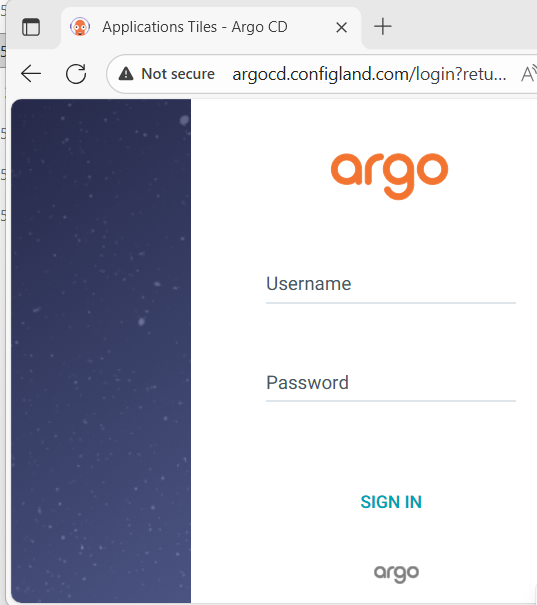
ArgoCD UI is ready. Now we can create required yaml files under the folder website-deploy on our local server. We will push these files to our git repo later.
Kubernetes Configuration Files:
We will create the following files in "website-deploy" folder that we created above.
app-configmap.yaml
app-deployment.yaml
app-pvc.yaml
app-secret.yaml
app-service.yaml
argocd.yaml
db-secret.yaml
db-statefulset-service.yaml
nginx-configmap.yaml
nginx-deployment.yaml
nginx-service.yaml
nano website-deploy/argocd.yaml (This file willcreate the ArgoCD application named django-argo)
#argocd.yaml
apiVersion: argoproj.io/v1alpha1
kind: Application
metadata:
  name: django-argo
  namespace: argocd
spec:
  project: default
  source:
    repoURL: https://github.com/selimatmaca/website-deploy.git
    targetRevision: HEAD
    path: .
  destination:
    server: https://kubernetes.default.svc
    namespace: default
  syncPolicy:
    syncOptions:
      - CreateNamespace=true
    automated:
      selfHeal: true
      prune: true
nano website-deploy/app-configmap.yaml
#app-configmap.yaml
apiVersion: v1
kind: ConfigMap
metadata:
  name: app-configmap
data:
  database_url: db-service
  DJANGO_ALLOWED_HOSTS: "*"
  DJANGO_LOGLEVEL: "info"
  DEBUG: "True"
  SQL_ENGINE: django.db.backends.postgresql
  SQL_DATABASE: webdb
  SQL_HOST: db-service
  SQL_PORT: "5432"
nano website-deploy/app-deployment.yaml
#app-deployment.yaml
apiVersion: apps/v1
kind: Deployment
metadata:
  name: app
spec:
  selector:
    matchLabels:
      app: app
  replicas: 2
  template:
    metadata:
      labels:
        app: app
    spec:
      volumes:
      - name: staticfiles
        persistentVolumeClaim:
          claimName: staticfiles
      containers:
      - name: app
        image: selimica/website-app:latest
        volumeMounts:
        - mountPath: "/static"
          name: staticfiles
        ports:
        - containerPort: 8000
        envFrom:
        - secretRef:
            name: app-secret
        - configMapRef:
            name: app-configmap
nano website-deploy/app-pvc.yaml
#app-pvc.yaml
apiVersion: v1
kind: PersistentVolumeClaim
metadata:
  name: staticfiles
spec:
  accessModes:
  - ReadWriteMany
  resources:
    requests:
      storage: 1Gi
  storageClassName: nfs-client
nano website-deploy/app-secret.yaml
#app-secret.yaml
apiVersion: v1
kind: Secret
metadata:
  name: app-secret
type: Opaque
data:
  SQL_USER: ZGJ1c2Vy          # "dbuser"
  SQL_PASSWORD: ZGJwYXNz      # "dbpass"
  #Base64 value for Django SECRET_KEY
  SECRET_KEY: <DjangoSecretKeyGoesHere>
nano website-deploy/app-service.yaml
#app-service.yaml
apiVersion: v1
kind: Service
metadata:
  name: app
spec:
#The selector tells Kubernetes which Pods this Service should target.It matches any Pod that has the label app: app — in my setup, this corresponds to the Django #app Pods defined in app-deployment.yaml
  selector:
    app: app
#traffic sent to the Service on port 8000 will be forwarded to container port 8000 inside my app Pods.
  ports:
  - port: 8000
    targetPort: 8000
nano website-deploy/db-secret.yaml
#db-secret.yaml
apiVersion: v1
kind: Secret
metadata:
  name: db-secret
type: Opaque
data:
  #Base64 values of the actual values
  POSTGRES_USER: ZGJ1c2Vy
  POSTGRES_PASSWORD: ZGJwYXNz
  POSTGRES_DB: d2ViZGI=
nano website-deploy/db-statefulset-service.yaml
#db-statefulset-service.yaml
apiVersion: apps/v1
kind: StatefulSet
metadata:
  name: db-statefulset
spec:
  replicas: 1
  selector:
    matchLabels:
      app: db
  template:
    metadata:
      labels:
        app: db
    spec:
      containers:
      - name: db
        image: postgres:15.1-alpine
        ports:
        - containerPort: 5432
        env:
        - name: POSTGRES_DB
          valueFrom: { secretKeyRef: { name: db-secret, key: POSTGRES_DB } }
        - name: POSTGRES_USER
          valueFrom: { secretKeyRef: { name: db-secret, key: POSTGRES_USER } }
        - name: POSTGRES_PASSWORD
          valueFrom: { secretKeyRef: { name: db-secret, key: POSTGRES_PASSWORD } }
        volumeMounts:
        - name: postgrespvc
          mountPath: /var/lib/postgresql/data    #mounts to default postgres path
  volumeClaimTemplates:
  - metadata:
      name: postgrespvc
    spec:
      accessModes: [ "ReadWriteOnce" ]
      resources:
        requests:
          storage: 1Gi
      storageClassName: nfs-client                # NFS StorageClass
---
apiVersion: v1
kind: Service
metadata:
  name: db-service
spec:
  selector:
    app: db
  ports:
  - protocol: TCP
    port: 5432
    targetPort: 5432
nano website-deploy/nginx-configmap.yaml (backend group called django that points to the Service named app on port 8000. Serving static and media files directly from Nginx instead of going through Django.)
#nginx-configmap.yaml
apiVersion: v1
kind: ConfigMap
metadata:
  name: nginx-configmap
#Everything inside the | block below will replace the content of default.conf file
data:
  default.conf: |
    upstream django {
      server app:8000;
    }

    server {
      listen 80;

      location / {
        proxy_pass http://django;
        proxy_set_header Host $host;
        proxy_set_header X-Real-IP $remote_addr;
        proxy_set_header X-Forwarded-For $proxy_add_x_forwarded_for;
        proxy_set_header X-Forwarded-Proto $scheme;
      }

      location /static/ {
        alias /static/;
        # try_files $uri =404;
      }

      location /media/ {
        alias /media/;
      }
    }
nano website-deploy/nginx-deployment.yaml
#nginx-deployment.yaml
apiVersion: apps/v1
kind: Deployment
metadata:
  name: nginx
spec:
  selector:
    matchLabels:
      app: nginx
  template:
    metadata:
      labels:
        app: nginx
    spec:
      volumes:
      - name: staticfiles
        persistentVolumeClaim:
          claimName: staticfiles
      - name: nginx-conf
        configMap:
          name: nginx-configmap
          items:
          - key: default.conf
            path: default.conf
      containers:
      - name: nginx
        image: selimica/website-nginx:latest
        ports:
        - containerPort: 80
        volumeMounts:
        - mountPath: "/static"
          name: staticfiles
        - name: nginx-conf
          mountPath: /etc/nginx/conf.d/default.conf
          subPath: default.conf
nano website-deploy/nginx-service.yaml
#nginx-service.yaml
apiVersion: v1
kind: Service
metadata:
  name: nginx-service
spec:
  selector:
    app: nginx
  ports:
  - port: 80
    targetPort: 80
We created all the yaml files we need for the application. Now,we need to modify jenkinsfile & add a new stage (update K8s Config Repo) because we want to replace image tag in app-deployment.yaml & nginx-deployment.yaml files. After these two files are updated, ArgoCD will be out of sync and will trigger the deployment on K8s cluster.
This is the new jenkinsfile we will be using (I just added the update stage). In previous articles, I explained the jenkinsfile. In this article I will just explain the update stage.
pipeline {
agent any
options {
timestamps()
disableConcurrentBuilds()
buildDiscarder(logRotator(numToKeepStr: '30'))
}
environment {
IMAGE_TAG = "${BUILD_NUMBER}"
DOCKER_BUILDKIT = '1'
COMPOSE_DOCKER_CLI_BUILD = '1'
}
stages {
stage('Cleanup Workspace') {
steps {
cleanWs()
}
}
stage('Checkout SCM') {
steps {
git url: 'https://github.com/selimatmaca/website.git',
branch: 'main',
credentialsId: 'GitHub'
}
}
stage('Build images (Compose)') {
steps {
sh 'docker compose build --pull'
}
}
stage('Login & Push') {
steps {
withCredentials([usernamePassword(
credentialsId: 'DockerHub',
usernameVariable: 'DOCKERHUB_USR',
passwordVariable: 'DOCKERHUB_PSW'
)]) {
sh '''
echo "$DOCKERHUB_PSW" | docker login -u "$DOCKERHUB_USR" --password-stdin
for IMG in website-app website-nginx website-postgres; do
docker tag selimica/$IMG:${IMAGE_TAG} selimica/$IMG:latest
docker push selimica/$IMG:${IMAGE_TAG}
docker push selimica/$IMG:latest
done
'''
}
}
}
stage('Update K8s Config Repo (image tags)') {
steps {
withCredentials([usernamePassword(
credentialsId: 'GitHub',
usernameVariable: 'GH_USER',
passwordVariable: 'GH_PAT'
)]) {
sh """
set -e
git config --global user.email "This email address is being protected from spambots. You need JavaScript enabled to view it. "
git config --global user.name "Jenkins CI"
rm -rf website-deploy
git clone https://$GH_USER:$This email address is being protected from spambots. You need JavaScript enabled to view it. /selimatmaca/website-deploy.git website-deploy
cd website-deploy
echo "Before:"
grep -R --line-number "image:" ./ || true
sed -i -E "s|image:\\\\s*selimica/website-app:[^[:space:]]*|image: selimica/website-app:${IMAGE_TAG}|g" app-deployment.yaml
sed -i -E "s|image:\\\\s*selimica/website-nginx:[^[:space:]]*|image: selimica/website-nginx:${IMAGE_TAG}|g" nginx-deployment.yaml
echo "After:"
grep -R --line-number "image:" ./ || true
git add app-deployment.yaml nginx-deployment.yaml
git diff --cached --quiet || git commit -m "AutoUpdateByJenkins-${BUILD_NUMBER}: updated image tags to ${IMAGE_TAG}"
git push origin main
"""
}
}
}
} // stages ends here
post {
always {
sh 'docker image prune -af || true'
sh 'docker builder prune -af || true'
sh 'docker logout || true'
}
}
}
Explanation of Update K8s Config Repo (image tags) stage: This stage updates your Kubernetes deployment YAML files in the GitHub repository (website-deploy) by replacing old Docker image tags with the new build number generated in Jenkins. Once the updated YAMLs are pushed, ArgoCD detects the change and automatically redeploys the new version to your Kubernetes cluster.
withCredentials: securely injects credentials stored in Jenkins.
credentialsId: 'GitHub': refers to the Jenkins credential entry that contains your GitHub username and Personal Access Token (PAT).
$GH_USER: GitHub username
$GH_PAT: GitHub Personal Access Token
set -e: This tells the shell to exit immediately if any command fails, It prevents continuing the pipeline if something fails.
The below 2 lines Sets up the Git identity used for commits. Without these, git commit would fail because Git needs an author name and email.
git config --global user.email "
git config --global user.name "Jenkins CI"
rm -rf website-deploy: Deletes any existing website-deploy folder (to ensure a clean clone).
Clones Kubernetes config repo (website-deploy) using the injected GitHub credentials (username and PAT).Then it navigates into the repo directory.
git clone https://$GH_USER:$
cd website-deploy
Below lines prints all lines that contain the word "image:" across all YAML files. || true ensures that the command doesn’t fail if grep finds nothing. This is just for logging purposes — you’ll see the old image tags in the Jenkins console.
echo "Before:"
grep -R --line-number "image:" ./ || true
These are the key update commands. Each command searches for the image line in the given YAML file and replaces the old tag with the new build number
sed -i -E "s|image:\\s*selimica/website-app:[^[:space:]]*|image: selimica/website-app:${IMAGE_TAG}|g" app-deployment.yaml
sed -i -E "s|image:\\s*selimica/website-nginx:[^[:space:]]*|image: selimica/website-nginx:${IMAGE_TAG}|g" nginx-deployment.yaml
sed: stream editor
-i : modify files in place
-E: use extended regular expressions
image: matches the text image: in YAML.
\s*: Matches zero or more whitespace characters
[^[:space:]]*: means “match any sequence of non-space characters.
|g: It ensures that if there are multiple image: lines in the same file, all of them are updated
Prints the image lines again so we can visually verify that the replacement worked.
echo "After:"
grep -R --line-number "image:" ./ || true
git add app-deployment.yaml nginx-deployment.yaml : Stages the modified YAML files so Git knows they’re ready to be committed.
The below line checks whether there are any changes staged. If changes exist, commits and push them.
git diff --cached --quiet || git commit -m "AutoUpdateByJenkins-${BUILD_NUMBER}: updated image tags to ${IMAGE_TAG}"
git push origin main
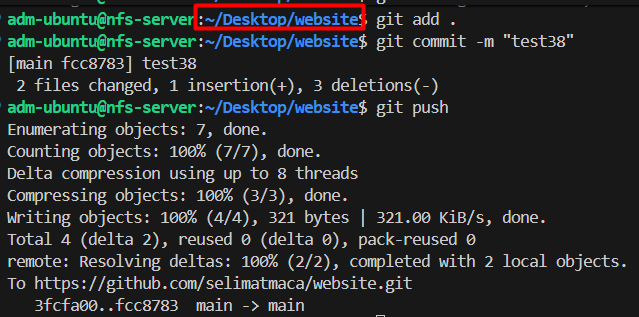
Our yaml files and jenkinsfile are ready, lets push them to GitHub (yaml files to website-deploy & jenkinsfile to website repositories)
git add .
git commit -m "upload yaml files"
git push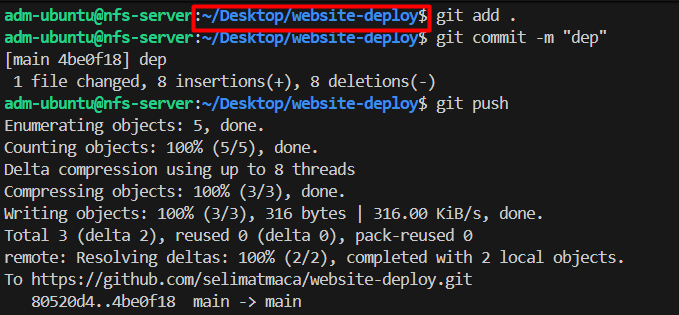
Add Git repo details to ArgoCD
Log on to ArgoCD > settings > Repositories > Connect Repo
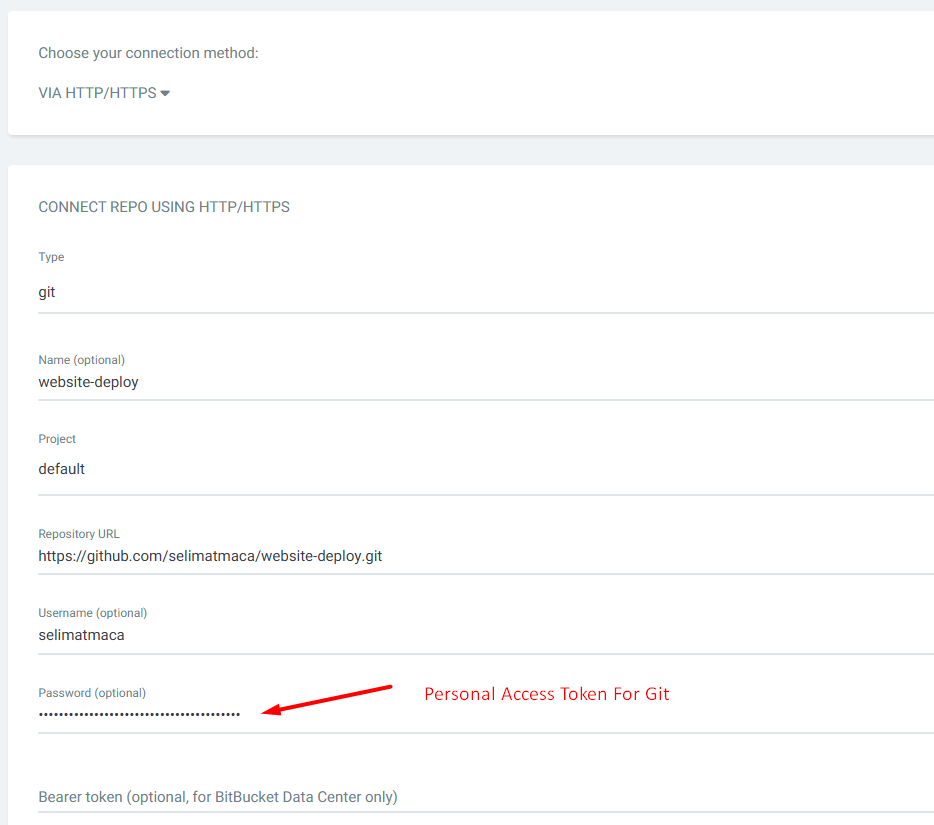

Add application to ArgoCD
kubectl -n argocd apply -f https://raw.githubusercontent.com/selimatmaca/website-deploy/main/argocd.yaml
#wait a minute then run
kubectl -n argocd get app django-argo
# Expected output: Synced / Healthy
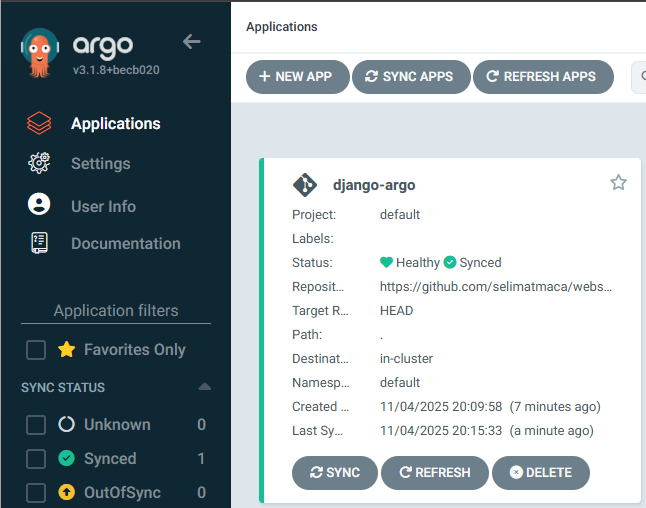
Django app works on the cluster now. We just need to allow external access to the app (add a ingress rule). Create a new file named ingress-django.yaml.
#ingress-django.yaml
apiVersion: networking.k8s.io/v1
kind: Ingress
metadata:
  name: django-ingress
  namespace: default
  annotations:
    kubernetes.io/ingress.class: "nginx"
spec:
  rules:
  - host: website.configland.com     # DNS name
    http:
      paths:
      - path: /
        pathType: Prefix
        backend:
          service:
            name: nginx-service
            port:
              number: 80
kubectl apply -f ingress-django.yaml
At this point I could either create a public DNS record for website.configland.com or I could just edit my local the host file. I added an entry (192.168.204.20 website.configland.com) to my local host file tfor quick testing.
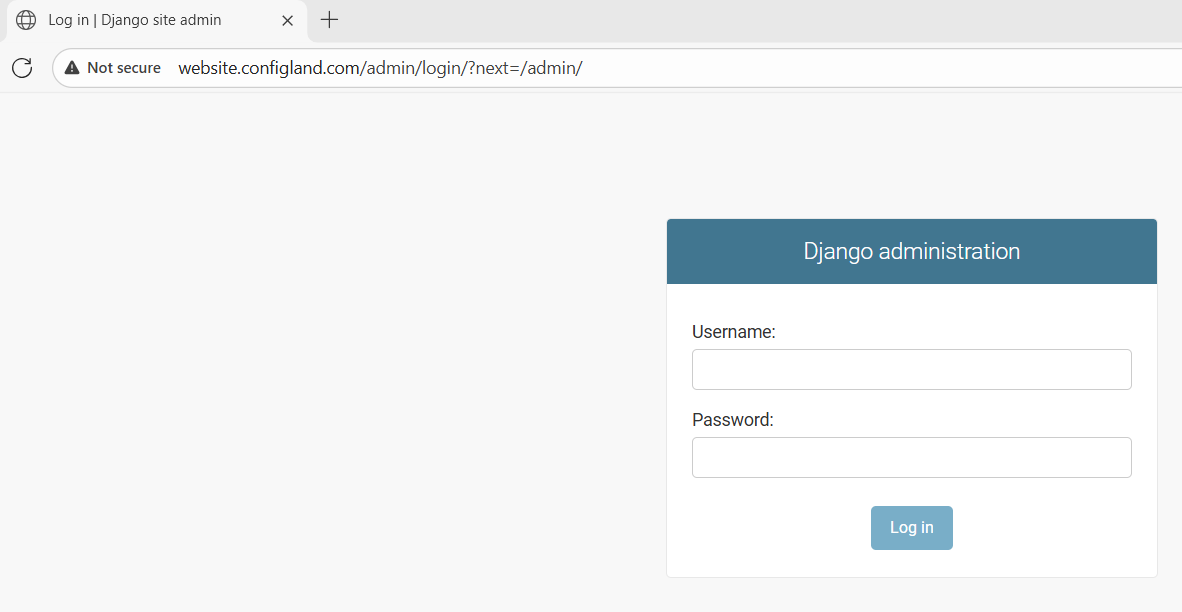
Testing The Future Deployments:
we can just modify a random file in app code and pushed to github like I did above. Then jenkins pipeline automatically triggers (pipeline #38 for example). I checked the dockerhub and saw that new images are uploaded (#38)
Console output shows that pipeline succesfully ran
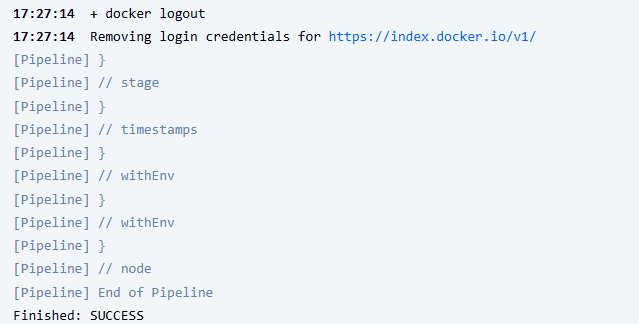
Images are uploaded to Dockerhub with the correct tags
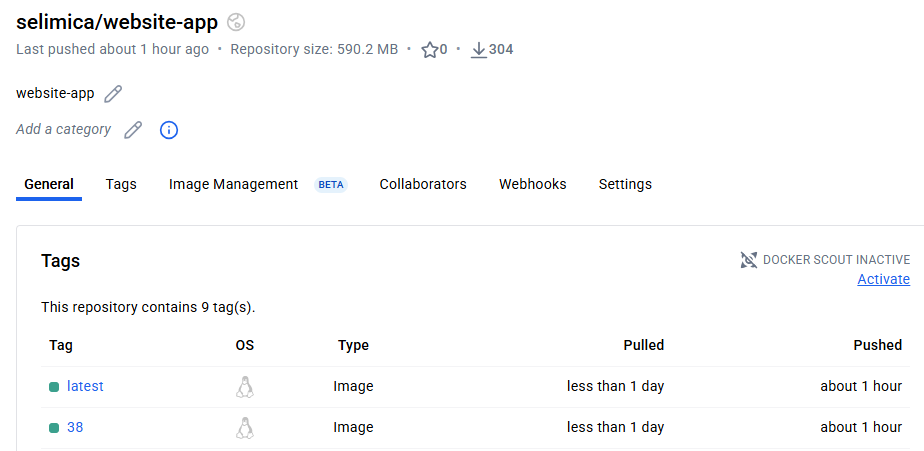
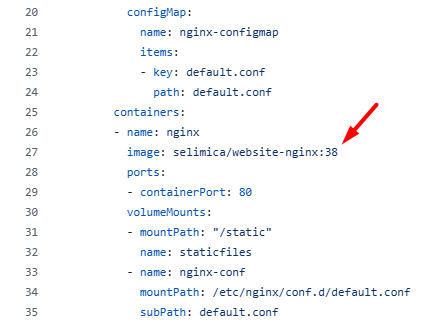
I checked the yaml files on website-deploy github repo and saw that images tags are successfully updated on nginx-deployment.yaml & app-deployment.yaml files. This update will cause ArgoCD to be out of sync and ArgoCD will try to resync with github repo (website-deploy), and new application will be deployed to my K8s cluster.
“In a production setup, ArgoCD should be secured behind HTTPS with authentication (OIDC or SSO) and isolated from public access. The current configuration runs ArgoCD in insecure mode for lab demonstration purposes.”
Finally :) Thanks for reading...